If you use windows XP and you need to have several sites under IIS, then you are in the same situation that I'm, but I found a solution and I want to share it with you.
The IIS under windows has some limitations because is supose that XP is not a server OS, just a workstation OS. Because of this the biggest limitation is that you "can't create sites". Well, let me tell you that this is not actually true, the IIS console doesn't have an option to create sites, but you do can create them, the only real limitation is that you can't have more than one site running on the same time. Here I bring to you two free tools to create and manage sites in IIS under windows XP. This tool has being a great help for me and I know it will be a great help to you too.
Do you use several computers, at home, at work and other places? Or perhaps you just don't like to install software in you PC. There are many reasons to put some attention in what I'll talk here today.
If you use more than one computer and you need to keep you notes, calendar, contacts, data and hopefully software close to you, I see 3 good options: use a mobile device, use internet services (I'll talk about this in a future blog) or use portable applications. I don't have a mobile device so I use internet services and portable applications, and today I'll talk about portable applications.
What is a portable application? These are applications made or adjusted to work without installation, this makes them perfect to be copied into any USB drive and carrie them to any place.
Where can I get these applications? There are several places, but I have a favorite, so I'll add at the end some links, but I will mostly talk about PortableApps.com.
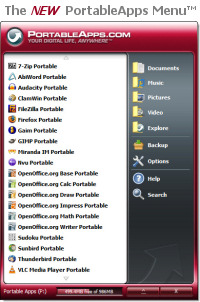
PortableApps.com is a site dedicated to adjust open source or freeware programs to work without installation and they all work on the same standard way. In the site you will see programs like OpenOffice (similar to MS Office), SunBird (calendar and task manager), ThunderBird (email client and address book), Firefox (web browser), Gaim (chat and messenger client), Gimp (photo and image editor), VLC (Media Player), Xampp (Web server), games and many other, also if you check in the forums you can find more programs like GVim (a great editor), Frozen Bubble (Game), Perfect-Mines (improved version of Minesweeper) and many others. And now they created a fancy menu to have them all accesible quickly (which you can see in the image above).
Using these programs you can always have with you all you need. And are all safe to use. I recomend you to try some of these, anyway they are free and you don't have to install them ;)
List for sites dedicated to portable applications PortableApps.com - **Collection of Microsoft Windows portable applications (Recomended) PortableFDM.net - Lo Mejor en Software Portable ! Blog for Portability - Blog for Portability USBSpace.com - Portable software for USB flash drives OS X PortableApps - Collection of Mac OS X portable applications winPenPack - Italian site. Collection of portable software TinyApps - Tiny applications for USB flash drives Portable Freeware - Collection of portable software No-Install - Collection of portable applications as well as portable devices and software news Portable Apps Collection - Collection of portable applications StandAlone - Portable applications for USB flash drives kikizas.net - Freeware programs to run from a USB flash drives AppOnKey.com - Portable environment FramaKey - Collection of packaged or standalone applications Bureau de Poche - French site. Collection of packaged applications Installing SLAX compilation to a USB flash drive in Windows Portable apps - Portable application for usb stick USB Hacks - Listing of USB exploit tools and mitigation